Zombie Mode
What is zombie mode?
When a player leaves a game, either by quitting or by being expelled after running out of time, they become a "zombie player". The game's results no longer count toward statistics, but the remaining players must still be able to finish the game.
Zombie mode lets the remaining players finish the game with a bot that replaces the player who left.
The different zombie levels
Level 0: the passing zombie
Move on to the next step without taking any action, unless an action is required to keep the game running.
For example, in 7 Wonders, choose a random card and discard it. Simply passing would leave the next player with the wrong number of cards.
For example, in Catan, roll the dice and pass.
Level 1: the random zombie
Choose a random legal action.
For example, in 7 Wonders, choose a random playable card and play it.
For example, in Catan, roll the dice and take a random legal action.
Level 2: the greedy zombie
Choose the action that provides the greatest immediate benefit based on the currently visible information. The zombie does not plan future moves or remember previously revealed information. It does not choose a less valuable action to block an opponent.
For example, in 7 Wonders, choose the card that gives the zombie player the most points. If several cards are tied, choose the cheapest one. If there is still a tie, choose randomly among the remaining cards.
For example, in Catan, roll the dice and take the action that gives the zombie player the most points.
Level 3: the smart zombie
Plan future moves, remember previously revealed information, or both.
For example, in 7 Wonders, remember which cards might come back on a later turn and use that information to choose the best move.
For example, in Catan, accept trades only when they benefit the zombie player, instead of declining all trades.
Expected level
Ideally, aim for level 1 or 2 in your implementation. For games that can only be played solo, level 0 is sufficient.
When developing zombie mode, keep these points in mind:
- The game's rules do not cover this situation, so they cannot tell you how to handle it.
- Imagine playing with friends when one of them has to leave. How could you finish while preserving the spirit of the game?
- You do not need to develop a full artificial intelligence for the game.
- Do not try to end the game early, even in a two-player game. The zombie is there to allow the game to continue, not to end it.
Once you have implemented zombie mode, set its level in the Game Metadata Manager. If different parts of your implementation use different levels, select the most common level. If two or more levels are equally common, select the lowest of those levels.
Implementing zombie mode
Whenever a zombie player must act, the framework calls the zombie function of that player's current state.
Current player
The framework calls your zombie code when a player leaves the game and whenever that player must act afterward. The server handles the zombie's turn, so there is no current player associated with the action. In your zombie function, never use getCurrentPlayerId() or getCurrentPlayerName(). Use $playerId or $this->getPlayerNameById($playerId) instead.
Level 0 example
Level 1 example
function zombie(int $playerId, array $args): void {
    // Choose a random move from the available moves.
    $zombieChoice = $this->getRandomZombieChoice($args['playableCardsIds']);

    // Return the action's result to end this function and transition to the next state.
    return $this->actPlayCard($zombieChoice, $playerId, $args);
}
Level 2 example
function zombie(int $playerId, array $args): void {
    $possibleSpaces = $args['possibleSpaces'];
    $playerCards = $this->getPlayerCards($playerId);

    $possibleAnswerPoints = [];
    foreach ($possibleSpaces as $choice) {
        // Calculate the points the zombie player would gain immediately from each choice.
        $possibleAnswerPoints[$choice] = $this->getPointsFromState3Choice($playerCards, $choice);
    }

    // Choose the move that gives the most points.
    $zombieChoice = $this->getBestZombieChoice($possibleAnswerPoints);

    // Return the action's result to end this function and transition to the next state.
    return $this->actPlayCard($zombieChoice, $playerId, $args);
}
Testing zombie mode
Use the debug tools to advance the game automatically by clicking the arrow button in the debug menu:
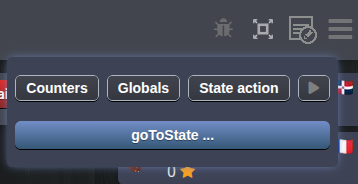
This button calls the zombie function of each active player's current state.
Testing what happens when a player leaves
Create a table in Friendly mode, then click Express Start. If you are starting from the game page, select the infinite time symbol to use Friendly mode.
Open the game as one of the other players, select Quit this game from the menu, and confirm.
Leaving a game in Friendly mode does not incur a karma penalty. In other modes, leaving reduces your karma. Repeated testing could lower your test player's karma enough to prevent them from joining games.